GraphSLAM: Flows
A flow-based walkthrough of GraphSLAM in IcePanel. It starts at the top level and zooms in step by step, down to the code. For the full write-up (theory, factor graph, parameters, testing), see the main GraphSLAM page.
GraphSLAM subscribes to several position sources (the simulator's car state, ground-truth, odometry, GNSS fixes and the GNSS pose), and we use that to estimate the cars recent trajectory (called path internally), current pose, the cone map, and other state variables. We publish this and pass them onto path planning and control so they can decide where the car needs to go, and how it will go there.
For this doc, Blue is the live race stack. The green stack runs alongside it for plots, metrics and diagnostics (scoring only works in sim). The yellow stack is offline tuning on recorded or simulated data. A few scoring parts are shared too!
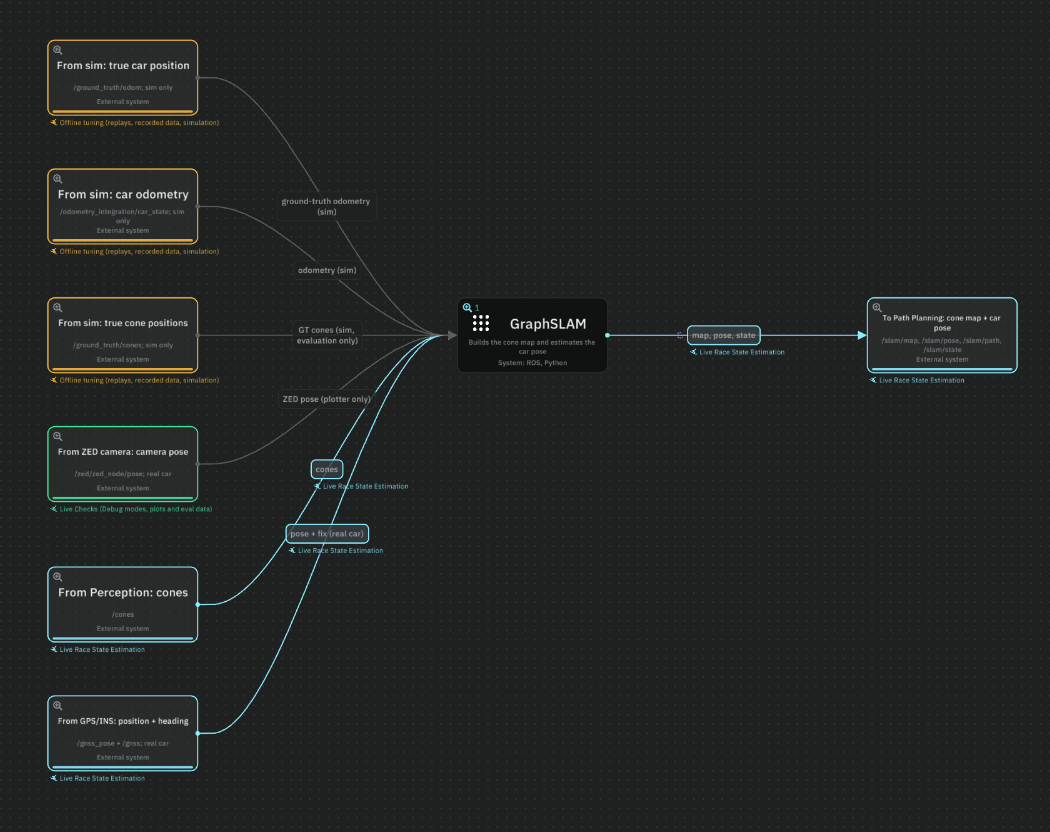
Inside the GraphSLAM node, we see the three paths clearly:
Live Race Stack
The only ESSENTIAL part of GraphSLAM is in one node. During the main runs it takes in the sensor data for cones position from perceptions and estimates the world state, and the GPS/INS sensors feed in so we can estimate our recent trajectory and pose.
slam_node subscribes to:
- /cones: cone positions and colours from Perception
- /gnss_pose: car position and heading from the Xsens GPS/INS
- /gnss: raw GPS status, only used to wait for a proper fix before we start
In sim (use_sim:=true) it swaps the GPS for /odometry_integration/car_state and /ground_truth/odom.
slam_node publishes:
- /slam/map: the cone map, x, y and colour of every cone we're confident in
- /slam/pose: where the car is right now, x, y and heading
- /slam/path: where the car has been (for RViz)
- /slam/state: lap count, and whether the map is done (MAPPING → LOCALISING)
No speed or velocity comes out of here, just position and heading.
Heads up: path planning and control still subscribe to
/mapand/pose(the old FastSLAM names), so these/slam/topics aren't plugged in yet.
Live debug stats/metrics
slam_evaluate: Used during simulation, when we have the true positions too. Scores our estimated map based on its error.
- Subscribes to /slam/map, /ground_truth/cones (the true cones) and /odometry_integration/car_state
- Each of our cones can match one true cone within 1.0 m, and the colour has to match
- Gives precision, recall and position error
- When the bag stops for 3 s it saves eval_gt.png and eval_gt_vs_slam.png
slam_plotter: Plots the cones out in the world we estimate.
- Subscribes to /slam/map, /slam/pose, and raw odometry (/odometry_integration/car_state in sim, /zed/zed_node/pose on the car)
- Black star is where SLAM thinks we are, red star is raw odometry, the gap is how much SLAM is correcting
- Saves slam_live.png when you Ctrl+C it
Both start with slam.launch.py and aren't needed to race. Turn them off with enable_plotter:=false and enable_evaluate:=false.
Offline tuning
slam_replay: Replays through ros bag recordings from real runs, lets us run simulations on real data too. We can look at the metrics from the green track to then make according changes.
- Not a ROS node, so it doesn't subscribe to anything. It reads the bag straight through in order
- No dropped messages, so the same bag gives the exact same map every time
- Runs the same GraphSLAM code as slam_node and the same scoring as slam_evaluate
python3 -m ft_state_estimation.slam.slam_replay bags/full_track_drive1 --plot
The loop: record a run → replay it → read the scores → change params → replay again. Params live in DEFAULT_PARAMS (slam_engine.py) and REAL_CAR_ENGINE_PARAMS (slam_node.py).
slam_node
Every time /cones comes in:
1. Add the car's current pose to the graph
2. Turn each cone into an angle and distance from the car
3. Seen this cone before? Match it to the nearest known cone within 1.7 m (colour has to match), otherwise it's a new cone
4. Link the pose to its cones in the graph
5. Optimise the whole graph with iSAM2. It only redoes the bits that changed, so it stays fast as the map grows
6. Publish map, pose, path and state
A cone only goes out on /slam/map once we've seen it twice, or once if it has a colour.
Startup: we wait for a GPS fix (or sim odometry) before any cones count. The first pose gets pinned as the origin. Startup flow
Laps and "map done": after 15 m of driving, getting back within 2 m and ~20° of the start counts a lap. The map is done when a lap is closed, 90% of cones are confirmed and almost no new cones are showing up. Then /slam/state flips to LOCALISING and stays there. Loop closure flow